
 Admin
AdminW-2 vs W-4: Key Differences Explained in Simple Words
Understanding W-2 vs W-4 starts with one simple difference: a W-4 helps your employer calculate how much federal income tax to withhold from your paycheck, while a W-2 reports your wages and taxes withheld for the year. Both forms are part of the payroll process, but you use them at different times.
Whether you are starting a job, managing payroll, or preparing your tax return, knowing how these forms work can help you avoid confusion and common mistakes. This guide explains their key differences, who completes each form, when you need them, and how they work together.
W-2 vs W-4: A Quick Comparison

The main difference between W-2 and W-4 is their purpose. A W-4 provides information used to calculate federal income tax withholding. A W-2 shows wages earned and taxes withheld during the year.
| Comparison | Form W-2 | Form W-4 |
| Official name | Wage and Tax Statement | Employee’s Withholding Certificate |
| Purpose | Reports annual wages and taxes withheld. | Helps employers calculate federal income tax withholding from paychecks. |
| Who completes it? | The employer prepares it using payroll records. | The employee completes it using their personal and financial information. |
| When is it needed? | After the year ends, to report wages and help employees prepare their tax returns. | When starting a job or updating withholding details. |
| Where does it go? | The employer sends copies to the employee and the Social Security Administration, plus state or local tax agencies when required. | The employee gives it to their employer, who generally keeps it in payroll records. |
| Effect on your paycheck | Does not change your paycheck; it reports amounts already paid and withheld. | Can change how much federal income tax is withheld, affecting take-home pay. |
| Role in tax filing | Provides income and withholding figures used to complete your tax return. | Guides withholding during the year; it is not attached to your tax return. |
Employees generally need both forms: the W-4 helps set up withholding, and the W-2 provides the year-end record.
What Is a W-2 Form?
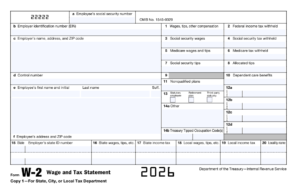
Form W-2, officially called the Wage and Tax Statement, is a yearly record of an employee’s wages and taxes withheld. It includes earnings such as salary, taxable bonuses, and reported tips. Employees use this information when preparing their income tax returns.
Who Prepares Form W-2 and Who Receives It?
The employer prepares Form W-2 using payroll records and provides copies to employees. Employers also file W-2 information with the Social Security Administration. A payroll provider may prepare it, but the employer remains responsible for accurate reporting.
You can receive a W-2 even if you worked for an employer for only part of the year. If you worked for several employers, you may receive a separate form from each. Independent contractors generally receive other tax forms instead of a W-2. IRS W-2 overview
What Information Does a W-2 Include?
A W-2 contains employee and employer identification details, along with several numbered boxes:
- Box 1: Wages, tips, and other compensation subject to federal income tax.
- Box 2: Federal income tax withheld.
- Boxes 3 and 4: Social Security wages and tax withheld.
- Boxes 5 and 6: Medicare wages and tax withheld.
- Box 12: Coded entries for certain contributions, benefits, and other items.
- Boxes 15–20: State and local wage and tax information, where applicable.
Your name, address, Social Security number, and employer’s details also appear on the form.
How Do Employees Use a W-2 to File Taxes?
Employees enter their W-2 information into tax software or give the form to their tax preparer. The wage and withholding figures help calculate whether they owe additional income tax or qualify for a refund.
Before filing, check your personal details and wage amounts. Include every W-2 you received for that tax year. When filing electronically, follow your software’s instructions; when mailing a federal paper return, attach Copy B. Keep a copy for your records. Form W-2 instructions
What Is a W-4 Form?
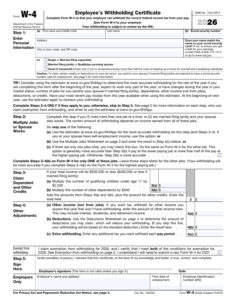
Form W-4, officially called the Employee’s Withholding Certificate, gives your employer information needed to calculate federal income tax withholding. Withholding is the money taken from your paycheck and paid toward your income tax during the year.
The form accounts for details such as your filing status, multiple jobs, eligible credits, and deductions.
Who Completes Form W-4 and Where Does It Go?
Employees complete Form W-4 and give it to their employer, usually through the HR or payroll department. Many businesses let employees submit it through an online payroll portal.
Your employer generally keeps the form on file. You do not attach it to your annual tax return. Employees normally complete it when starting a job and submit an updated form when changes affect their withholding.
How Does a W-4 Affect Your Paycheck?
Your employer uses your W-4 information, earnings, and federal withholding tables to calculate federal income tax withholding from your pay.
More federal income tax withheld means less take-home pay. Less withholding means more take-home pay, but you could owe additional tax when filing your return. Changing your W-4 adjusts tax payments during the year; it does not, by itself, reduce your final tax bill. Form W-4 instructions
Does the Current W-4 Still Use Allowances?
No. The federal W-4 stopped using withholding allowances when it was redesigned in 2020. Advice about “claiming zero” or “claiming one” refers to the older form.
The current form uses filing status and dollar amounts for credits, deductions, other income, and extra withholding. Complete only the sections that apply to your situation.
An older W-4 already on file is not automatically invalid. Employees generally do not need to replace it solely because the form was redesigned, but updates should use the current version. W-4 FAQs
How to Fill Out Form W-4 Step by Step

Use the current Form W-4 and complete Steps 2–4 only when they apply to you. Have recent pay stubs and details of your income, dependents, and deductions ready. The Tax Withholding Estimator can help you work out suitable entries, especially if you are making changes during the year.
Step 1: Enter Your Personal Information and Filing Status
Enter your name, address, and Social Security number. Choose your expected tax filing status. Make sure your name matches your Social Security records.
Step 2: Account for Multiple Jobs or a Working Spouse
Complete this step if you have multiple jobs at the same time, or you file jointly and your spouse also works.
Choose one method: the withholding estimator, the Multiple Jobs Worksheet, or the two-jobs checkbox. If using the checkbox, check it on both jobs’ W-4 forms.
Step 3: Claim Dependents and Other Credits
Enter eligible dependent and other tax credits using the form’s instructions and income limits.
For multiple jobs, complete Steps 3–4(b) on only one W-4, preferably for the highest-paying job.
Step 4: Add Other Income, Deductions, or Extra Withholding
This step has three parts:
- 4(a): Other annual income you want withholding to cover.
- 4(b): The amount calculated using the Deductions Worksheet.
- 4(c): Additional tax you want withheld each pay period.
Step 5: Sign and Submit the Form
Review your entries, sign and date the form, and submit it to your employer. Keep a copy for your records. Form W-4 instructions
How Do W-2 and W-4 Forms Work Together?
W-2 and W-4 forms connect two stages of the payroll process. Your W-4 provides information for calculating federal income tax withholding during the year. Your W-2 reports your wages and the taxes actually withheld after the year ends.
Your W-4 Helps Payroll Calculate Federal Income Tax Withholding
Your employer uses your W-4 details, earnings, and federal withholding tables to calculate how much federal income tax to withhold from each paycheck.
If your situation changes, submitting an updated W-4 helps payroll adjust future withholding. For example, taking a second job may mean you need additional withholding. An updated form does not change amounts already withheld from earlier paychecks.
Businesses using QuickBooks can explore our QuickBooks Payroll guide to understand payroll setup and employee pay calculations.
Your W-2 Reports Annual Wages and Taxes Withheld
After the year ends, your employer prepares your W-2 using payroll records. It shows your taxable wages, federal income tax withheld, and other details, including Social Security and Medicare taxes.
The amounts come from actual payroll totals. Your employer does not simply copy the credits or deductions entered on your W-4 onto your W-2. You use the reported wage and withholding figures when preparing your tax return.
A Simple Example of the W-4 to W-2 Process
Suppose Maria starts a job and completes her W-4. Her employer uses that information to calculate federal income tax withholding each payday.
For illustration, assume her year-end payroll records show:
- Federal taxable wages: $50,000.
- Federal income tax withheld: $4,000.
Her employer reports $50,000 in Box 1 of her W-2 and $4,000 in Box 2. These are example amounts, not a withholding estimate for everyone earning $50,000.
When Maria files her tax return, the $4,000 counts toward her federal income tax payments. Whether she receives a refund or owes more depends on her total income, deductions, credits, and other tax payments.
When Are W-2 and W-4 Forms Due?
Employers have an annual deadline for W-2 forms. Employees usually submit W-4 forms when they start a job or need to change their withholding.
When Employers Must Provide and File W-2 Forms
Employers generally must send W-2 forms to employees and file them with the Social Security Administration by January 31 of the following year. If that date falls on a weekend or legal holiday, the deadline moves to the next business day.
For wages paid during 2026, the deadline is February 1, 2027. A mailed employee copy may arrive after the deadline because delivery takes time.
When Employees Should Submit a W-4
Submit your W-4 when starting a job, ideally before your first payroll is processed. This gives your employer the information needed to calculate withholding from the beginning.
Most employees don’t need to submit a new W-4 every January. A valid existing form generally stays in effect until you replace it. However, employees claiming exemption from federal income tax withholding must renew that claim annually if they remain eligible.
When You Should Review or Update Your W-4
Review your withholding each year and after changes that could affect your taxes, such as:
- Getting married or divorced.
- Having or adopting a child.
- Starting or leaving a second job.
- A spouse starting or stopping work.
- Significant changes in income, deductions, or credits.
- Receiving an unexpectedly large refund or tax bill.
A review does not always mean you need a new form. If you need an adjustment, submit an updated W-4 promptly and check later pay stubs to confirm the change. Withholding updates may take a payroll cycle or more to appear.
W-2 vs W-4 vs 1099: Which Forms Apply to You?
The forms you use depend on whether you work as an employee or an independent contractor. Employees generally use W-4 and W-2 forms. Contractors typically provide a W-9 and may receive a 1099-NEC. Someone with a regular job and freelance work could receive both a W-2 and a 1099-NEC.
Forms Used by Employees
Employees complete a W-4 to help their employer calculate federal income tax withholding. After the year ends, the employer provides a W-2 showing wages and taxes withheld.
Employers generally withhold federal income tax, Social Security tax, and Medicare tax from employee pay. They also pay the employer share of Social Security and Medicare taxes.
Employees use their W-2 information to report wages and withholding on their tax returns. The employer keeps the W-4 and uses it to guide future payroll calculations.
How W-9 and 1099-NEC Forms Apply to Independent Contractors
Independent contractors generally complete Form W-9 when a business requests their taxpayer information. It provides details such as their name, tax classification, and taxpayer identification number. The contractor gives it to the requesting business.
The business uses this information to prepare Form 1099-NEC, which reports payments for services when reporting requirements apply. For payments made during 2026, the general federal reporting threshold is $2,000, subject to exceptions.
Contractors usually receive payments without payroll taxes withheld, although backup withholding can apply in certain situations. They generally handle their own income and self-employment tax and may need to make estimated tax payments.
Not receiving a 1099-NEC does not make business income tax-free. Contractors must still report taxable income. Worker status depends on the actual working relationship; choosing a form does not determine whether someone is an employee or contractor.
Common W-2 and W-4 Mistakes and How to Avoid Them
Small mistakes on W-2 and W-4 forms can lead to incorrect withholding, reporting problems, or extra work during tax season. Employees should check their information carefully, while employers should review payroll records throughout the year.
Entering an Incorrect Name or Social Security Number
A misspelled name or incorrect Social Security number can cause problems matching wage records to the right employee.
Check that your name matches your Social Security records and review each digit before submitting your W-4. When your W-2 arrives, check these details again. Report errors to your employer so they can correct payroll records and any affected forms.
Missing Multiple Jobs or Changes in Household Income
Withholding may be too low if each job’s payroll calculation treats that job as your only income. This can also happen when married employees file jointly but overlook a working spouse.
Complete the relevant multiple-job section and review withholding when household income changes. Avoid entering the same dependent credits on several W-4 forms, as this can reduce withholding more than intended.
Confusing Tax Withholding with Your Final Tax Bill
Withholding is an advance payment toward income tax. Your final tax bill depends on your full-year income, deductions, credits, and other applicable tax rules.
Reducing withholding increases take-home pay, but it does not automatically reduce the tax you owe. Aim for withholding that reflects your situation, not entries chosen to receive a larger paycheck.
Not Applying Updated W-4 Information in Payroll
An updated W-4 affects withholding only after payroll applies it. Processing delays can leave employees paying more or less tax than intended.
Employers should record when updates arrive and apply them within the required timeframe. Employees should review later pay stubs and contact payroll if an expected adjustment does not appear.
Reporting Incorrect Wages or Missing W-2 Deadlines
Incorrect wage totals, missing taxable benefits, or inaccurate withholding figures can lead to W-2 corrections. Late preparation also increases the chance of rushed mistakes.
Employers should compare year-end figures with payroll records, review benefit entries, and confirm the applicable filing deadline. Preparing early gives the payroll team time to investigate differences before issuing forms.
What Should You Do If Your W-2 Is Missing or Incorrect?
A missing or incorrect W-2 can make tax filing harder, but there are steps you can take to resolve the problem. Start by checking your payroll portal and contacting your employer.
Contact Your Employer or Payroll Department
If your W-2 hasn’t arrived after the employer’s deadline and a reasonable delivery time, ask payroll whether they mailed it or made it available electronically. Confirm that they have your current address.
If you received the form but something looks wrong, explain the issue and provide supporting records, such as pay stubs. Remember that federal taxable wages can differ from gross pay because of certain pre-tax deductions. Ask payroll to explain any difference before assuming it is an error.
Request a Corrected W-2 When Needed
Your employer may need to issue Form W-2c, Corrected Wage and Tax Statement, to fix reported information such as incorrect wages, withholding, or a Social Security number.
An address-only error may be handled differently, so let payroll determine the appropriate correction. Keep both the original form and any corrected copy, and make sure your tax preparer receives the updated information.
Follow the Next Steps If the Issue Remains Unresolved
If you have contacted your employer and still do not have the missing or corrected W-2 by the end of February, contact the IRS for assistance. Have your employment dates, employer details, and wage records ready.
If the form remains unavailable when you need to file, Form 4852 may allow you to report estimated wages and withholding using reliable records. Follow its instructions rather than guessing amounts.
You must still meet your tax filing obligations. An extension gives you more time to file, but generally does not extend the time to pay. If a later W-2 changes the figures you reported, file an amended return using Form 1040-X.
How Can Employers Keep W-2 and W-4 Records Accurate and Secure?

W-2 and W-4 forms contain sensitive details, including Social Security numbers, home addresses, and financial information. Employers need a consistent process to check these records and protect them from unauthorized access.
Review Payroll Records Throughout the Year
Regularly compare payroll reports with wage payments, tax withholding, and benefit records. This helps identify missing entries or incorrect amounts before W-2 preparation begins.
Check that updated W-4 details have been entered correctly and applied to the appropriate employee—record when each update was received and became effective. Before issuing W-2 forms, review annual totals and ask employees to confirm their names and mailing addresses through a secure process.
Limit Access to Employee Tax Information
Give access only to staff who need employee tax records for their work. For example, a manager who approves working hours may not need access to Social Security numbers or withholding details.
Use individual accounts instead of shared logins, and enable multi-factor authentication where available. Review permissions when employees change roles or leave the business. Access logs can also help employers investigate who viewed, downloaded, or changed sensitive records.
Use Secure Storage, Backups, and Document Sharing
Protecting employee records starts with choosing where to keep them. Encrypt digital files and restrict access to approved users. Printed forms belong in locked storage. Avoid keeping extra copies on personal laptops or shared computers.
A backup is useful only if you can recover it when needed. Test file recovery regularly and restrict access to backup copies just as carefully as you protect the main records.
When sending tax documents, choose a secure portal or a file-sharing system with recipient permissions. Confirm who will receive the files before granting access. Forms containing complete Social Security numbers should not be sent as unprotected email attachments. Keep records for the required period, then securely dispose of paper and digital copies.
For firms that prepare returns with desktop applications, tax software hosting offers another way for approved staff to reach their software and client files from different locations.
Final Thoughts
The main distinction between a W-2 and a W-4 is what each document does: one supplies information for paycheck withholding, and the other records the year’s earnings and withheld taxes. Knowing which form to check can help you address payroll questions sooner.
For employees, a useful routine is to check withholding when circumstances change and review wage statements before preparing a return. Businesses can support that process by keeping payroll information current, checking reported amounts, and handling employee documents carefully.
Frequently Asked Questions
Is a W-4 the Same as a W-2?
These forms have separate jobs. You give your employer a W-4 so payroll can work out federal income tax withholding. Your employer later gives you a W-2 containing annual wage and withholding figures for tax filing.
Do I Need to Complete a New W-4 Every Year?
Usually, you can keep your existing W-4 in use as long as it still fits your circumstances. Check it periodically, especially after income or family changes. An exemption claim is different: eligible employees must submit a new claim for each year they want it to continue.
What Happens If I Do Not Submit a W-4?
For a new employee without a valid W-4, payroll generally uses the single or married filing separately setting and leaves Steps 2–4 blank. This calculation may not reflect your household’s needs. If your employer already holds a valid W-4, that form generally remains the basis for withholding.
Do I Send My W-4 to the IRS?
The usual recipient is your employer. You can deliver it through HR, payroll, or the company’s approved online system. It becomes part of the employer’s records. The IRS can request a review, but employees do not routinely send the form directly to the agency.
Do I Need to Attach My W-2 to My Tax Return?
How you file determines what you do with the form. A mailed federal return normally requires Copy B attached according to the filing instructions. With an electronic return, your software collects the W-2 details, so you generally don’t need to mail it separately.
Can I Receive More Than One W-2?
Working for different employers during one tax year can produce several W-2s. A former employer may send one even if you left months earlier. Report the information from each distinct form, taking care not to count additional copies of one W-2 as separate earnings.
Can I Claim Exemption from Withholding on a W-4?
Eligibility generally requires both no federal income tax liability for the previous year and an expectation of none for the current year. A refund does not necessarily mean you meet those conditions. Qualifying for this exemption also generally leaves Social Security and Medicare withholding in place. Review the withholding exemption requirements before making a claim.
Does Changing My W-4 Change My Previous W-2?
Submitting a different W-4 cannot rewrite last year’s payroll history. It changes withholding on future pay once it takes effect. A past W-2 needs correction only when its reported information is wrong; contact the employer responsible for that form to resolve an error.
Is a W-4 the Same as a W-2?
No. Think about when you use them: at the start of a job, you fill in a W-4 with details that help payroll calculate federal income tax withholding. After the year finishes, you receive a W-2 showing your earnings and the tax taken from your pay.
Do I Need to Complete a New W-4 Every Year?
A new calendar year usually doesn’t mean more W-4 paperwork. If your details are still correct, your employer can generally keep using the existing form. Review it when your circumstances change. If you claim exemption from withholding, however, you must renew that claim annually while eligible.
What Happens If I Do Not Submit a W-4?
Leaving out the form does not stop tax deductions. When no valid W-4 is available, a new employee’s withholding is generally calculated using “Single or Married filing separately,” without adjustments in Steps 2–4. An existing valid W-4 generally stays in use until replaced.
Do I Send My W-4 to the IRS?
Hand it to the team that manages your pay, or complete it through your employer’s approved system. Your employer keeps the information needed for payroll. You typically don’t mail a W-4 to the IRS yourself, although the agency may ask to review it.
Do I Need to Attach My W-2 to My Tax Return?
For online filing, follow the software prompts to enter or upload your wage statement. You generally do not send a paper copy afterward. If you submit your federal return by post, include the W-2 copy marked “Copy B” as directed in the return instructions.
Can I Receive More Than One W-2?
Yes. For example, someone who changes jobs in June may get one wage statement from the old employer and another from the new one. Both belong in that year’s tax calculation. Extra copies of the same statement should not be entered again.
Can I Claim Exemption from Withholding on a W-4?
Check two things before claiming exemption: did you have any federal income tax liability last year, and do you expect any this year? You generally need to answer “no” to both. Getting money back after filing is not enough to qualify. Social Security and Medicare deductions generally still apply.
Does Changing My W-4 Change My Previous W-2?
No. If you update your withholding instructions today, payroll applies them to future pay once processed. The update does not alter a wage statement for an earlier year. If that statement contains a mistake, ask the employer to review it and arrange the necessary correction.